Resources · Technical SEO

Technical SEO checklist for service-business websites

A printable checklist for the layer under a service-business website: crawling, canonicals, redirects, status codes, structured data, speed, mobile, internal links, analytics, lead tracking and market targeting. Each item says why and how to check.

Checklist · Updated · Free to use and share with a link to this page.

Send us your site
Overview

Search engines can only rank what they can reach.

A service-business site has one job: turn a search into an inquiry. What usually stops it is invisible on the page: a staging rule left in robots.txt, a redirect chain after a redesign, a stray canonical, a form that reports leads twice. This list covers that layer, not keywords or copy.

Keep the sitemap and Search Console open, and write today's date at the top.

Audit order

Reach it, read it, then measure it.

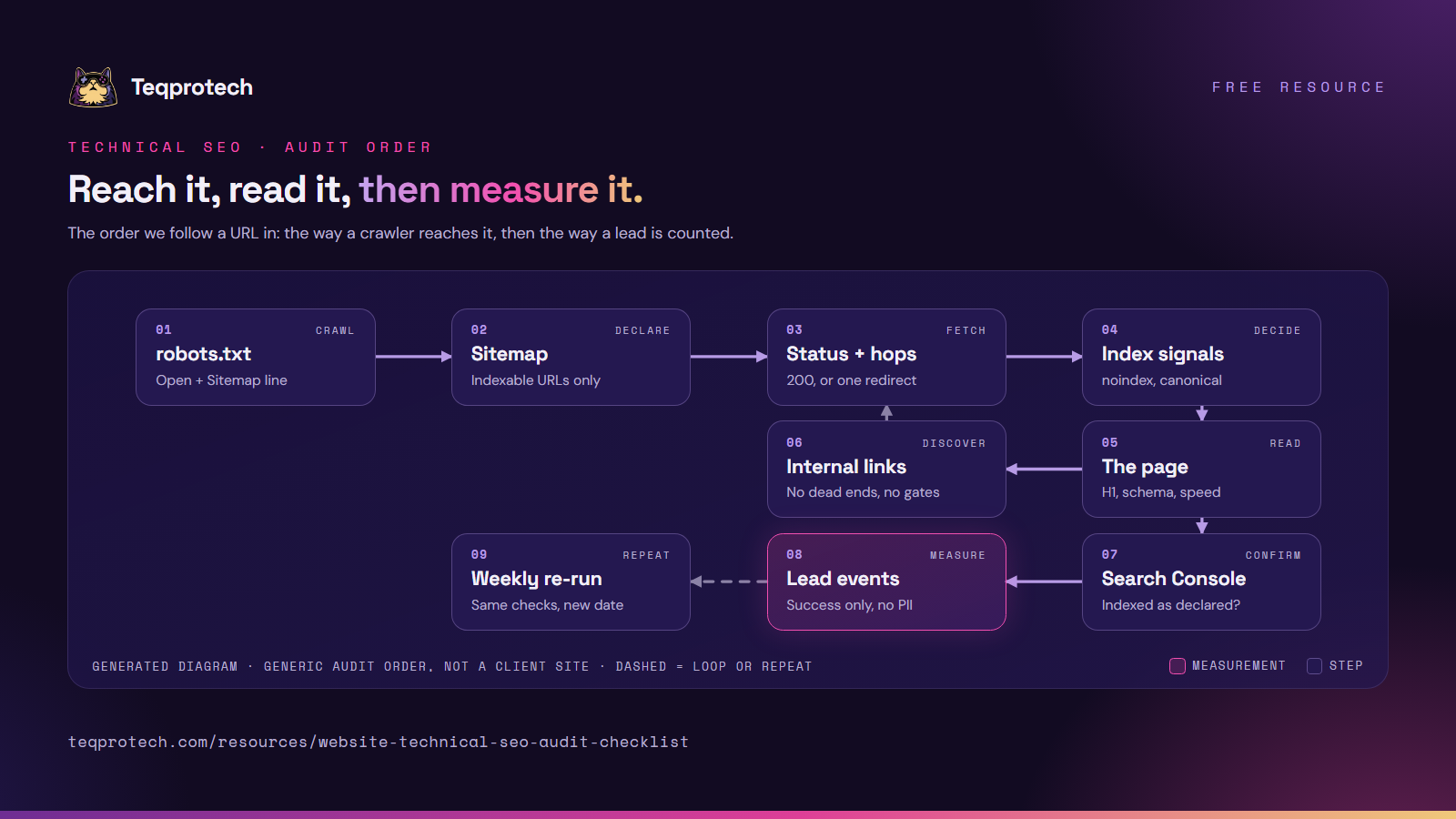
Follow a URL the way a crawler does, then the way a lead does: reach it, fetch it, decide whether it counts, read it, then measure what it brings in.
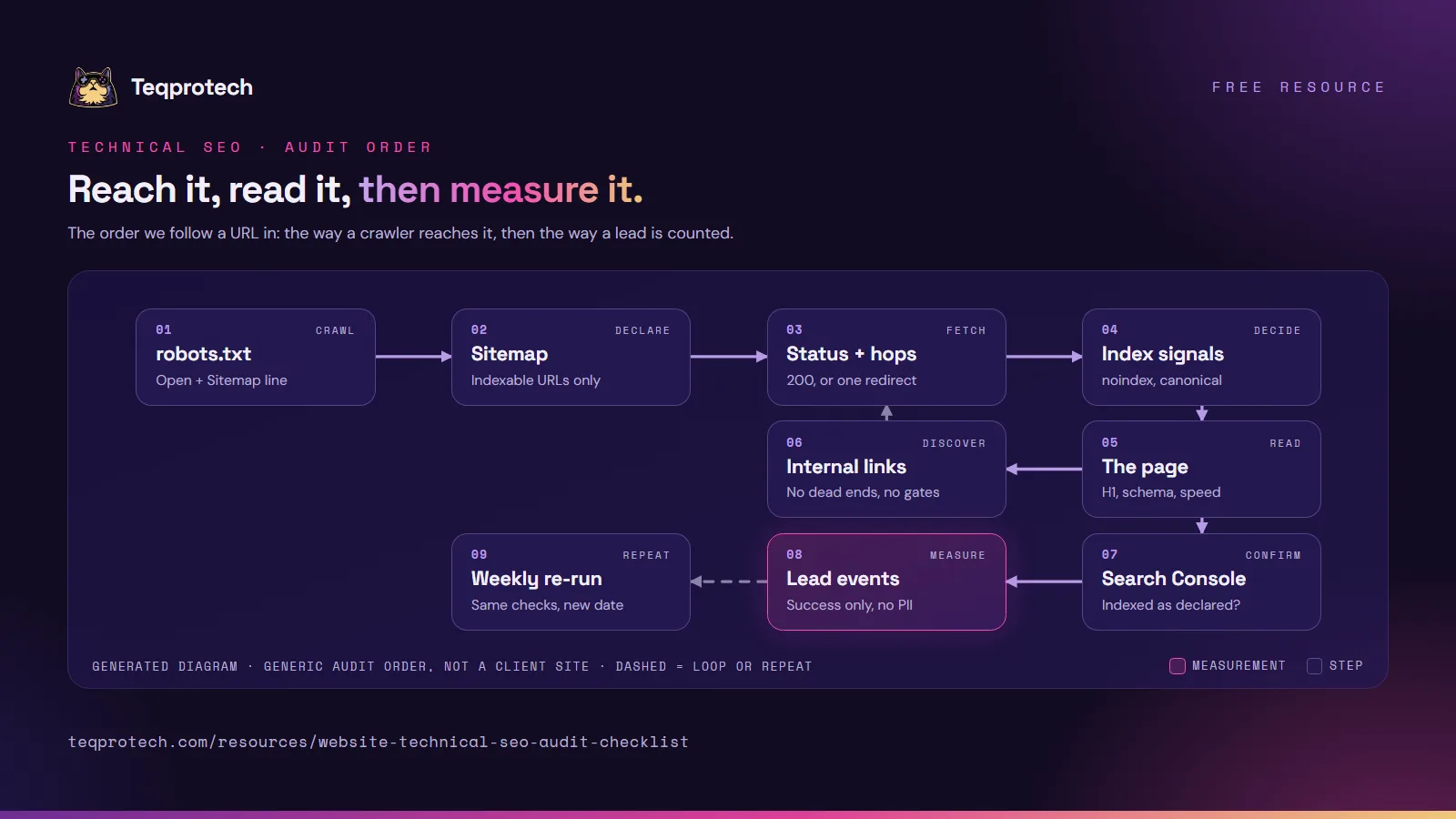
Technical SEO audit order Start with robots.txt and the sitemap. Fetch each URL and check its status and redirects, then its index signals: noindex and canonical. Check the page itself, then the internal links, which lead back to more URLs to fetch. Confirm in Search Console what was indexed, check the lead events, and re-run the same checks every week. robots.txtOpen + Sitemap line SitemapIndexable URLs only Status + hops200, or one redirect Index signalsnoindex, canonical The pageH1, schema, speed Internal linksNo dead ends, no gates Search ConsoleIndexed as declared? Lead eventsSuccess only, no PII Weekly re-runSame checks, new date Technical SEO audit order Start with robots.txt and the sitemap. Fetch each URL and check its status and redirects, then its index signals: noindex and canonical. Check the page itself, then the internal links, which lead back to more URLs to fetch. Confirm in Search Console what was indexed, check the lead events, and re-run the same checks every week. robots.txtSitemap line SitemapIndexable only Status + hops200 or one hop Index signalsnoindex, canonical The pageH1, schema, speed, mobile Internal linksNo dead ends ConsoleIndexed? Lead eventsNo PII Re-runWeekly
Main path Decision or human step Optional or feedback pathGenerated diagram of a generic pattern, not a screenshot of a client system.
Read the flow as text
  1. robots.txt: open to crawlers and naming the sitemap.
  2. Sitemap: only canonical, indexable URLs that return 200.
  3. Status: each URL returns 200, or reaches its final address in one redirect.
  4. Index signals: no stray noindex; the canonical points at the page itself.
  5. The page: one H1, valid structured data, fast and readable on a phone.
  6. Internal links resolve and skip gated pages; new URLs found here go back to step 3.
  7. Search Console: compare what was indexed with the sitemap.
  8. Lead events: sent on success only, with no personal data.
  9. Re-run the same checks every week and after each release.

Download and share

Technical SEO audit order diagram in nine steps. Top row: robots.txt open with a Sitemap line, a sitemap of indexable URLs only, status and redirect hops (200 or one redirect), and index signals (noindex, canonical). Middle row: the page itself (H1, schema, speed) and internal links, which loop back to status checks for new URLs. Bottom row: Search Console, lead events sent on success only with no personal data, and a weekly re-run.

Download the diagram (PNG)

The audit order on one image, for a launch checklist or a handover. Please credit and link this page.

PNG · 1600 × 900 · 320 KB Download the diagram (PNG)
Cover page of the technical SEO checklist summary for service websites: 28 checks in 11 groups, with the Teqprotech cat mascot.

Download checklist summary (PDF)

The 11 groups on six pages, one line each, for a team meeting. For every check with why and how, use Print or save as PDF above.

PDF · 6 pages · 2.3 MB Download checklist summary (PDF)
Checklist · Crawl and index

Robots, sitemaps and noindex gates.

  • robots.txt lets crawlers in. Why: a Disallow: / copied from staging hides everything. How to check: open /robots.txt; confirm it blocks neither the site nor CSS and scripts, and names the sitemap.
  • The sitemap lists only pages you want found. Why: redirects, noindex pages and 404s in it send mixed signals. How to check: request every sitemap URL; each should return 200, be indexable and have no future lastmod.
  • Unfinished pages sit behind a gate. Why: an indexed half-page is the first impression for that search. How to check: each draft has a noindex tag, no sitemap entry, no menu link and no link from public pages.
Checklist · Canonicals and duplicates

One address per page.

  • Every indexable page names itself. Why: without a canonical, Google picks a variant for you. How to check: confirm an absolute https canonical pointing at the same URL.
  • Variants collapse to one URL. Why: parameters, trailing slashes, capitals and copies on a second domain split signals. How to check: request a page with ?utm_source=test and without its trailing slash; expect one redirect or one canonical target.
Checklist · Redirects

One hop, every time.

  • http and www reach the https address in one hop. Why: each extra hop slows the first visit. How to check: request http://, http://www. and https://www. and count redirects. If the host answers plain http before your rules, note the extra hop as a hosting limit.
  • Old URLs have a planned answer. Why: a redesign turns old links into 404s. How to check: map each retired URL to a 301 to its closest replacement, or a 410 if it is gone, and test every row after each release.
  • No chains or loops. Why: chains slow crawlers; loops lock visitors out. How to check: follow every rule and confirm it ends on a 200 in one step.
Checklist · Status codes and broken links

Say what really happened.

  • Missing pages return a real 404. Why: a "not found" page answering 200 is a soft 404. How to check: request a made-up URL and read the status code, not the page.
  • Internal links don't break or bounce. Why: a link to a 404 or a redirect wastes the click and the crawl. How to check: crawl the site and update each link to its final address.
Checklist · Structured data

Valid, and true.

  • JSON-LD parses. Why: one stray comma drops the block. How to check: run each page type through the Rich Results Test.
  • Markup matches the page. Why: FAQ markup without a visible FAQ, or hours that differ from the page, gets ignored. How to check: compare each property with the visible text.
  • No ratings you can't show. Why: invented or self-awarded stars break Google's structured data policies and risk a manual action. How to check: remove rating and review markup not backed by real, visible reviews.
Checklist · Performance basics

Core Web Vitals, plainly.

  • Real-user data comes first. Why: Core Web Vitals (loading, responsiveness, layout stability) are judged on real visits. How to check: read the Search Console report, then test the weakest page groups in PageSpeed Insights on mobile.
  • Images carry their size. Why: images without width and height shift the layout. How to check: every img has both, uses WebP where possible, and lazy-loads below the fold.
  • Scripts wait their turn. Why: chat widgets and tag managers loaded first delay the content. How to check: list third-party scripts; each is deferred or loads after interaction.
Checklist · Mobile

The version Google reads.

  • Phone and desktop carry the same content. Why: Google indexes the mobile version. How to check: compare headings, text, links and structured data on both.
  • Nothing scrolls sideways. Why: wide tables and fixed widths push content off screen. How to check: at phone width, tables scroll inside their box and buttons are easy to tap.
Checklist · Internal linking

Every page is reachable.

  • No orphan pages. Why: a page nothing links to is found late. How to check: compare the sitemap with a crawl from the home page and link anything the crawl missed.
  • Public pages never link drafts. Why: that link leads visitors to a dead end and crawlers to a page you hid. How to check: unlink the text or publish the target first; breadcrumbs only link pages that exist.
Checklist · Analytics and Search Console

See what search sees.

  • Search Console and Bing Webmaster Tools are verified. Why: they say what was indexed or excluded, and why. How to check: verify the https property, submit the sitemap, and read the indexing report monthly.
  • One analytics tag, consent respected. Why: duplicate tags double-count, and ignoring consent is a privacy problem. How to check: one GA4 tag per page, off when a visitor declines or sends a Global Privacy Control signal.
Checklist · Conversion tracking

Count leads, not people.

  • The lead event fires on success only. Why: counting clicks counts failed and spam submissions. How to check: submit once with an error and once correctly; only the second sends the event.
  • No personal data in events or URLs. Why: names, emails and messages don't belong in analytics. How to check: in GA4 DebugView, allow only fixed values such as an industry key or a country code.
  • The event is a key event. Why: otherwise it is invisible in reports. How to check: mark it in GA4 and confirm one test lead appears.

To follow that test lead past analytics, into the CRM and a dated baseline, use the pre-launch attribution checklist.

Checklist · Local and international targeting

Real pages for real markets.

  • One page per service, not one per city. Why: near-identical city or keyword pages are doorway pages under Google's spam policies. How to check: merge pages that differ only by place name into one that lists the areas you serve.
  • One English page can serve the US, the UK and Australia. Why: respelled copies are duplicates. How to check: show prices with their currency, such as US$, and the markets and hours you really cover.
  • hreflang only for truly localized versions. Why: on identical pages it adds nothing. How to check: no translated or locally different pages means no hreflang tags.
How we check our own sites

The same list, every week.

A read-only script runs most of this list on our sites every Monday. Each sitemap URL must return 200 without a redirect, with a self-referencing canonical, no noindex, one H1, JSON-LD that parses and a share image that loads. Every internal link is requested, http and www must reach the https address, and each retired URL must give its planned 301 or 410. Errors open an issue. Pages in review stay noindex and out of the sitemap, so the change notice we send to search engines, which lists only changed sitemap URLs, never announces them.

After the checklist

Fix in order of reach.

Fix crawling and indexing first: nothing else counts until a page is reached. Then redirects and links, then structured data and speed, then measurement. Change one thing at a time, re-run after each release, and keep the dated list for next month.

Start here

Want a second pair of eyes on your site?

Tell us the address and what worries you about it. The brief form opens with WordPress selected; we start with the sitemap, a crawl and Search Console, before changing anything.