
Lead routing and CRM automation for real estate teams
How we approach capture, routing, appointments and long-term nurture for agents, teams and brokerages, and where the IDX website fits.

A printable architecture guide for agents, teams and brokerages: where leads come from, how they become one contact, how routing and agent acceptance work, what happens when nobody accepts, and where a person has to decide.
A real estate lead is cheap to lose and expensive to replace. The most common way to lose one isn't a slow message. It's a lead that reaches nobody in particular, or three agents at once. This guide is a routing architecture: who gets each lead, how fast they have to accept it, what happens when they don't, and how leads that aren't ready come back months later.
It is a pattern, not a client case study. The patterns (speed-to-lead, deduplication, assignment, booking) come from hands-on CRM and automation work. We haven't delivered an IDX or MLS integration for a client, so for the IDX part we describe how we design the handoff, not a product we have shipped. Print it and write your own tools and rules next to each step.
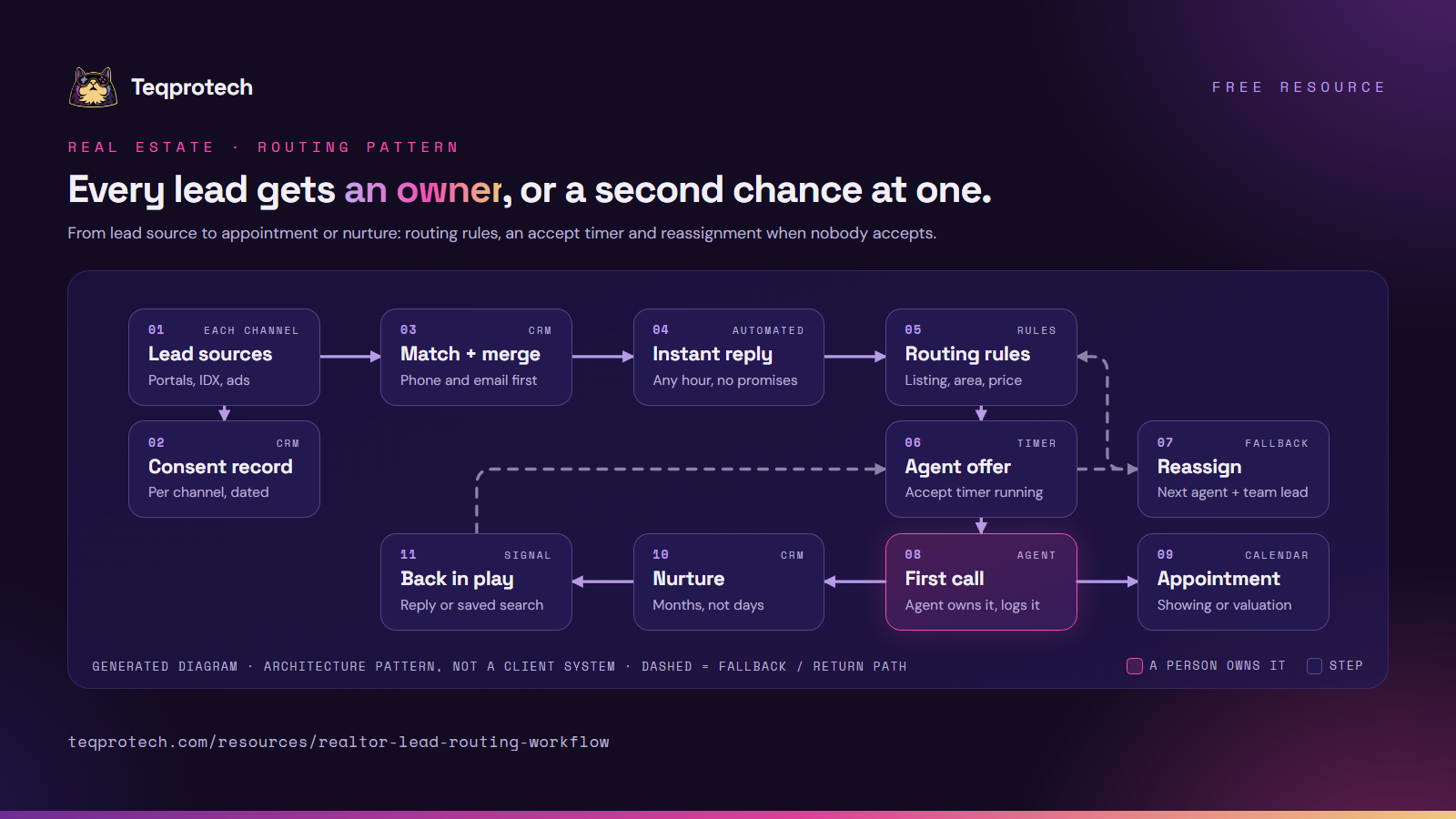
Read the top row left to right, then down. Magenta marks the step a person owns. Dashed lines are the fallback and the return path.
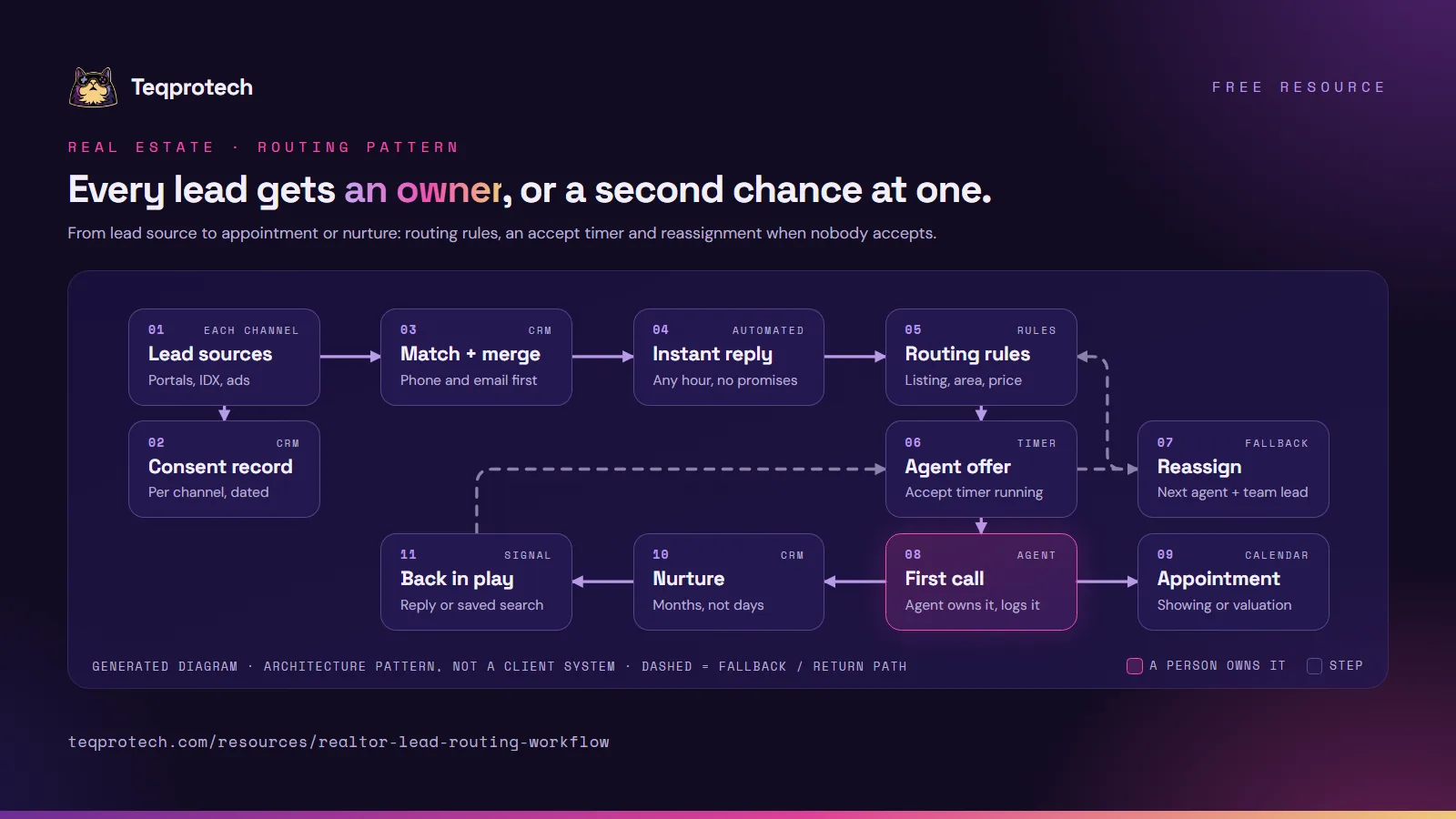
The routing pattern on one image, for a team meeting or a planning doc. Please credit and link this page.
Download the diagram (PNG)
Sources, dedupe, routing, timers, nurture and consent on six pages. For the full tables, use Print or save as PDF above.
Download the summary (PDF)| Source | Usually arrives as | Capture | Watch for |
|---|---|---|---|
| Listing portals | A lead email or an integration the portal offers | Listing asked about, message, source | Parsing that breaks when the email layout changes |
| IDX website | The IDX provider's lead delivery | Saved search, viewed homes, area, price range | Registrations that never reach the CRM |
| Site and valuation forms | A form submission or webhook | Buyer, seller or both; property address | Sellers treated as buyers |
| Facebook lead ads | A native CRM connection | Form name, campaign, your custom questions | Unmapped questions that sync as blanks |
| Google lead forms | A webhook to your CRM or an integration tool | Campaign, form, answers | A changed URL or key that drops leads |
| Calls and texts | The phone system | Caller number, call outcome | Calls that leave no record on the contact |
| Open houses | A sign-in form or QR code | Property, visit date, consent | Paper sheets typed in days later |
Send every source through one intake path, so routing, timers and consent work the same way for all of them.
| Order | Rule | Typical use |
|---|---|---|
| 1 | Existing relationship | The contact already has an agent |
| 2 | Listing agent | An inquiry on a specific listing |
| 3 | Territory | Zip codes, postcodes, suburbs or named areas |
| 4 | Price band | Agents who handle a given range, such as luxury or first homes |
| 5 | Stated preference | A language the person asked for on the form |
| 6 | Round-robin | Everyone else, weighted if agreed, skipping agents who are away or at capacity |
| 7 | Fallback | The team lead, when no agent is eligible |
Route on the property, the area, the price band and what the person told you, never on guesses about who they are. Fair housing rules in the US, and equality and anti-discrimination laws in the UK and Australia, apply to automated routing and messages as much as to people, so have your broker review the rules and templates before launch.
| Moment | Example setting (agree your own) | What happens |
|---|---|---|
| Lead arrives | Right away | Automatic text or email: inquiry received, and when a person will call |
| Agent offer | Accept within a few minutes during business hours, longer at night | Push notification and text to the chosen agent |
| Timer runs out | Once | The lead goes to the next eligible agent; the team lead is told |
| Second miss | Once more | The lead goes to a shared pool or the team lead |
| Accepted, no contact logged | Within the hour | A reminder to the agent, then an alert to the team lead |
| After hours | Overnight | The reply says when the office opens; nobody promises an instant call |
These are example settings to agree with your team, not benchmarks. Two details matter more than the numbers: acceptance is a button the agent presses, not an assumption, and every reassignment is logged so the team lead can see who missed what.
The MLS owns listing data and its display rules, and your IDX provider shows it under that license. The CRM owns the person: contact details, consent, inquiries, tasks, appointments and notes. We design the handoff between them: the delivery method your provider supports (a webhook, a native integration, Zapier or a parsed notification email) and the fields that travel: name, phone, email, inquiry type, listing ID or address, search area and price range, source and campaign, consent flags and a timestamp. Read your provider's documentation first; the options vary.
Record what each person agreed to, per channel, with the date, the form and the wording. Honor STOP and unsubscribe replies everywhere at once.
Important: This is a pattern, not a client case study. It describes no specific brokerage, account or result. The consent and fair-housing notes are considerations to review with your broker or compliance adviser; they are not legal advice and not a complete list.
Source: https://teqprotech.com/resources/realtor-lead-routing-workflow · Teqprotech, updated October 10, 2026. Free to use and share with a link to the page above.
List your lead sources, your IDX provider, your CRM and how leads reach agents today. The brief form opens with GoHighLevel and real estate selected, and we reply with handoff questions first.