Resources · CRM automation

CRM automation failure checklist

A printable checklist for the failures that don't announce themselves: expired connections, retried webhooks, rate limits, duplicates and loops, timezones, drifting field mappings, missing alerts, test data in live systems, thin audit trails and flows nobody owns. Each item says why it matters and how to check it.

Checklist · Updated · Free to use and share with a link to this page.

Describe what broke
Overview

Most automation failures are quiet.

An automation that crashes is easy: someone notices. The expensive ones keep running and do the wrong thing, or stop and say nothing. This list is for the gaps between tools, where a CRM, a form, Zapier or n8n, a webhook and your own code each assume another one is checking. If the account is GoHighLevel, run the GoHighLevel automation audit checklist for the inside of the account; this one covers the seams.

Work through it with a copy of each flow's run history open, one test record you can safely change, and today's date at the top.

Triage order

Contain it, trace it, then fix it.

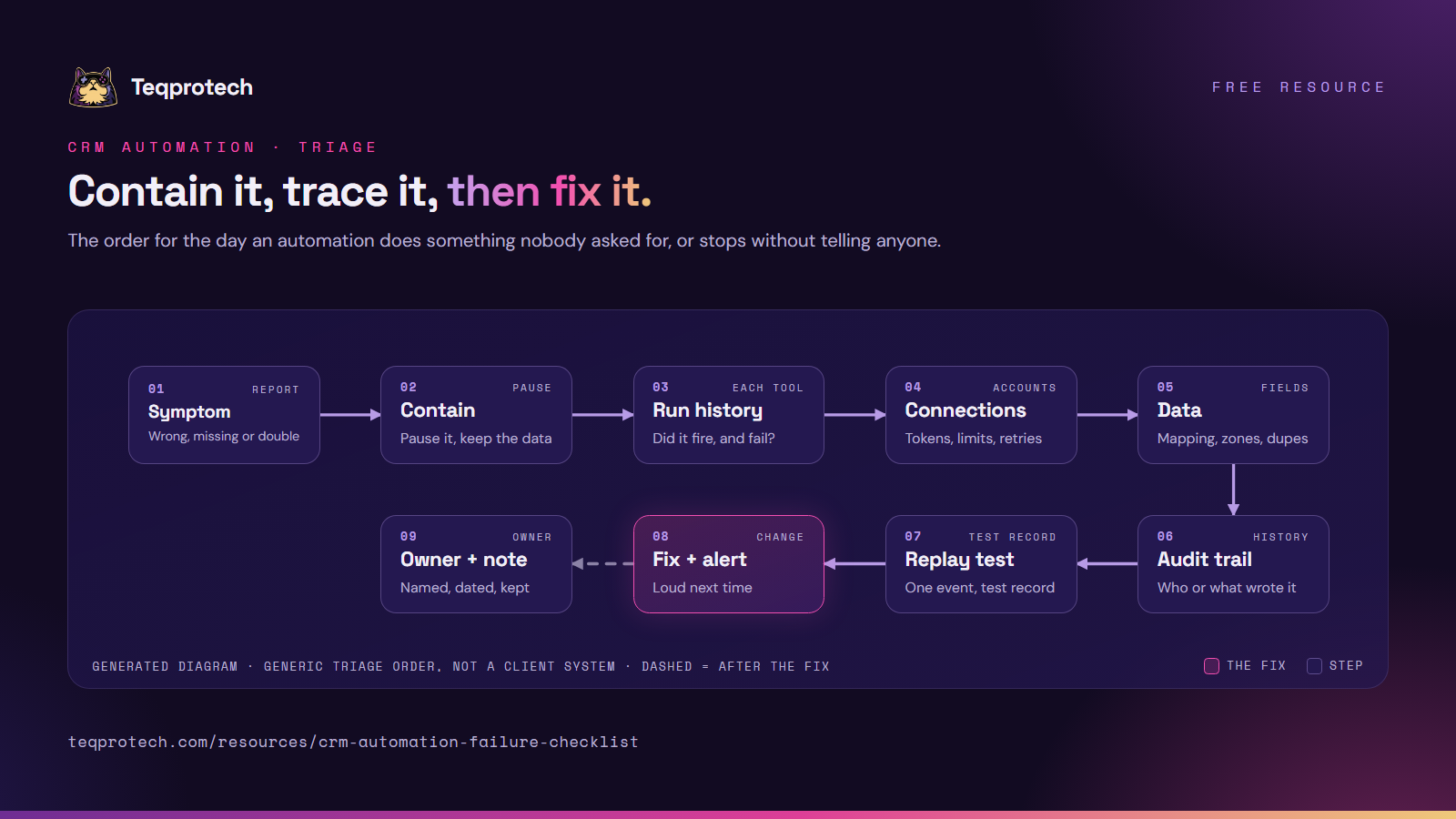
The order matters on a bad day: stop the damage, read what ran, rule out the connection, then the data, then fix and make the next failure loud.
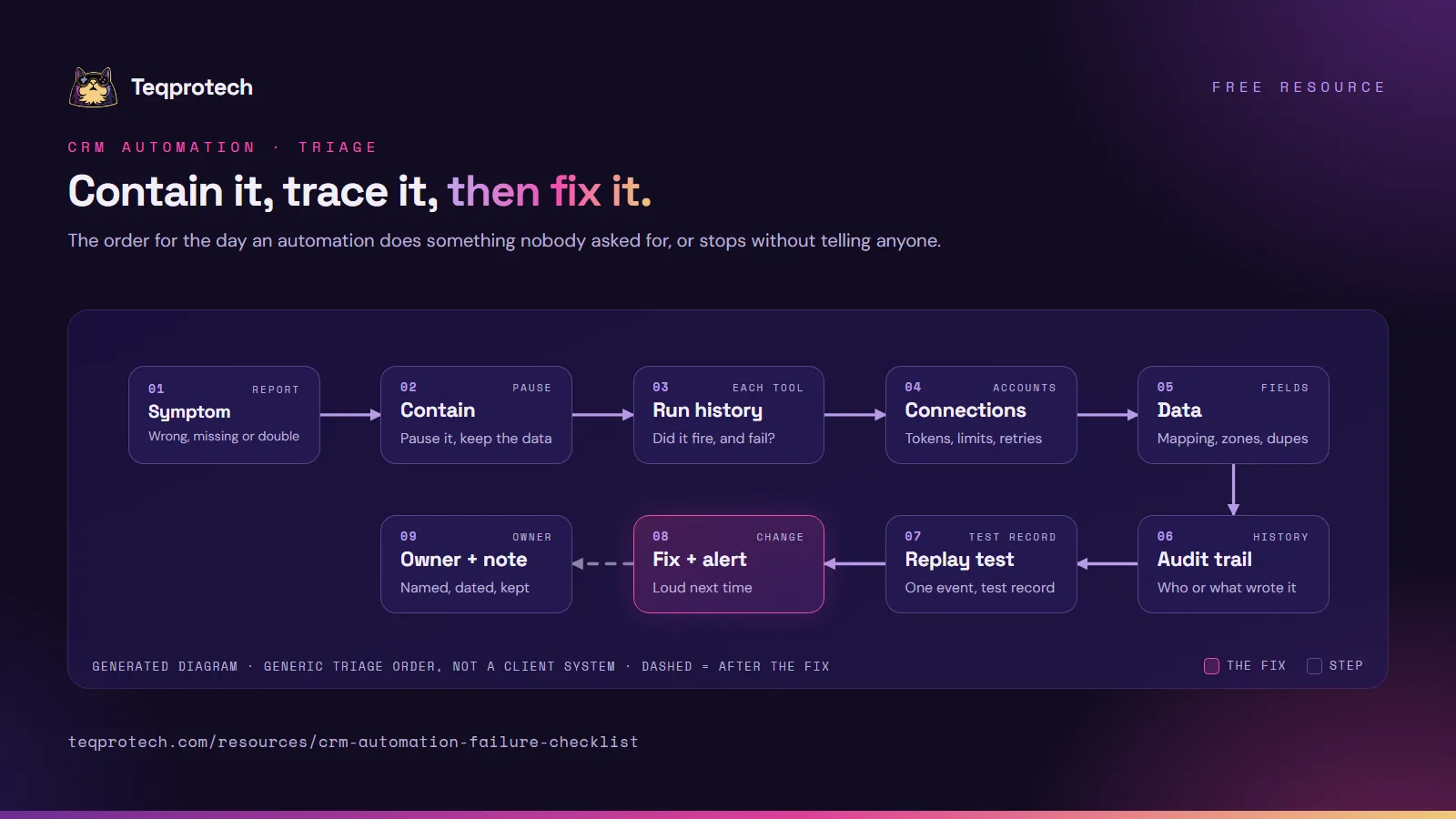
CRM automation failure triage Start from the symptom. Contain it by pausing the flow without deleting data. Read the run history, then check connections and then the data. Read the audit trail to find who or what wrote the value. Replay one event on a test record, fix the cause and add an alert, and record the owner with a dated note. SymptomWrong, missing or double ContainPause it, keep the data Run historyDid it fire, and fail? ConnectionsTokens, limits, retries DataMapping, zones, dupes Audit trailWho or what wrote it Replay testOne event, test record Fix + alertLoud next time Owner + noteNamed, dated, kept CRM automation failure triage Start from the symptom. Contain it by pausing the flow without deleting data. Read the run history, then check connections and then the data. Read the audit trail to find who or what wrote the value. Replay one event on a test record, fix the cause and add an alert, and record the owner with a dated note. SymptomWrong, missing, double ContainPause it, keep the data Run historyDid it fire, and fail? ConnectionsTokens, limits, retries DataMapping, zones, dupes Audit trailWho or what wrote it Replay testOne event, test record Fix + alertLoud next time Owner + noteNamed, dated, kept
Main path Decision or human step Optional or feedback pathGenerated diagram of a generic pattern, not a screenshot of a client system.
Read the flow as text
  1. Symptom: a record is wrong, missing or doubled, or a message went out at the wrong time.
  2. Contain: pause the flow or the sync. Don't delete records or history yet.
  3. Run history: confirm whether the flow fired, which step failed and what error it gave.
  4. Connections: check tokens, rate limits and webhook retries.
  5. Data: check field mappings, timezones and duplicate keys.
  6. Audit trail: find which user, flow or integration last wrote the value.
  7. Replay one event on a test record and confirm the result in every tool.
  8. Fix the cause, add an alert for the next occurrence, and record the owner with a dated note.

Download and share

CRM automation failure triage diagram in nine steps. Top row: a symptom (wrong, missing or double), contain it by pausing without deleting data, read the run history, check connections (tokens, limits, retries), then check the data (mapping, timezones, duplicates). Bottom row: read the audit trail for who or what wrote the value, replay one event on a test record, fix it and add an alert, and record the owner and a dated note.

Download the diagram (PNG)

The triage order on one image, for the wall or a runbook. Please credit and link this page.

PNG · 1600 × 900 · 318 KB Download the diagram (PNG)
Cover page of the CRM automation failure checklist summary: 25 checks in eight groups, with the Teqprotech cat mascot.

Download checklist summary (PDF)

The eight groups on five pages, one line per check, for a team meeting. For every check with why and how, use Print or save as PDF above.

PDF · 5 pages · 2.1 MB Download checklist summary (PDF)
Checklist · Silent failures

Connections, retries and limits.

  • Every connection is alive. Why: access tokens expire, and a revoked or expired connection can stop a flow without a visible error. How to check: list the connected accounts in each automation tool and reconnect anything marked expired or failing.
  • Webhook deliveries are counted on both sides. Why: many senders retry when the receiver is slow or returns an error, so one event can arrive twice, or never after the sender gives up. How to check: pick one event and compare the sender's delivery log with what your receiver recorded.
  • Rate limits are handled, not hit. Why: a bulk import can exceed an API's request limit, and rejected requests may be dropped instead of retried. How to check: search run history for "too many requests" (HTTP 429) errors and confirm the flow waits and tries again.
  • Switched-off flows are noticed. Why: some platforms turn a flow off after repeated errors, and a stopped flow looks like a quiet week. How to check: filter each tool's flow list by status and ask why each inactive one is off.
Checklist · Duplicates and loops

One event, one record.

  • Every create step matches first. Why: creating a record per event turns one person into several. How to check: send the same test event twice and count the records in each tool.
  • Two-way syncs have a winner per field. Why: when both tools write the same field, each change echoes back and the last writer wins. How to check: write down the owning system for each synced field, then edit it on the other side and watch.
  • Self-triggering flows have a brake. Why: a flow that updates the record that started it can run again and again. How to check: look for flows triggered by an update that also update that record, and count the runs per record.
Checklist · Time

Clocks, offsets and daylight saving.

  • Each tool's timezone is written down. Why: a server on UTC, an account set to one city and a user in another turn a morning send into a night one. How to check: note the timezone setting of every tool and compare one event's timestamp across them.
  • Dates travel with an offset. Why: "09:00" without a timezone is read in the receiver's clock. How to check: inspect one real payload and confirm date-time fields carry an offset or are in UTC.
  • Clock changes are tested. Why: the US, the UK and Australia change clocks on different dates, and parts of Australia don't change at all. How to check: book a test appointment on the far side of the next change and read the reminder.
Checklist · Field-mapping drift

When a sync "succeeds" with nothing.

  • Mapped fields still exist. Why: a renamed or deleted field can make a step write blanks while reporting success. How to check: compare each mapping with the current field list of both tools.
  • Dropdown and stage values match. Why: "Won" on one side and "Closed won" on the other is rejected or ignored. How to check: lay the option lists side by side for every mapped picklist and pipeline stage.
  • Missing values have a fallback. Why: one empty required field can fail the whole step. How to check: send a test record with only an email address and follow it through every step.
Checklist · Error alerts

Someone hears about it.

  • Failures reach a person. Why: run history records errors that nobody reads. How to check: make one test step fail on purpose and see who is told, and where.
  • Alerts say what to do. Why: "a step failed" with no record or flow name sends someone hunting. How to check: read the last alert and confirm it names the flow, the record, the error and a link.
  • Silence is an alert too. Why: a flow that stops firing raises no error at all. How to check: for each critical flow, agree how often it should run and confirm an alert fires when it doesn't.
Checklist · Test vs live data

Keep practice out of production.

  • Test records are marked and filtered. Why: test contacts receive real messages and skew reports. How to check: search for your test records and confirm reports, sequences and sales alerts exclude them.
  • Tests can't reach live side effects. Why: a "test" that sends a real text or writes to the live CRM is a live change. How to check: list every external action in the flow and confirm the test path stops or uses sandbox credentials.
  • Edits are tried before they go live. Why: changing a live flow changes it for records already inside. How to check: confirm recent edits were made as drafts or copies and run with a test record first.
Checklist · Audit trails

Proof of what happened.

  • You can trace any field's last change. Why: without it, every fix is a guess. How to check: pick one record and follow its field history to a user, a flow or an integration.
  • Your own code logs each event. Why: the platform's history ends where your webhook endpoint starts. How to check: for one event, find its log entry with the event ID, the record touched and the result.
  • History is kept long enough. Why: problems often surface weeks later. How to check: note each tool's history retention and export what you need before it expires.
Checklist · Ownership

A name on every flow.

  • Every flow has an owner. Why: "the agency built it" is not an owner. How to check: keep a list of flows with one named owner each; a blank line is a finding.
  • Connections don't depend on one person's login. Why: when that person leaves or changes a password, every flow on their login can stop. How to check: note whose account each connection uses and move business-critical ones to a shared, documented account.
  • Someone knows how to stop it. Why: on a bad night, a flow that keeps sending does more damage every minute. How to check: ask each owner where they would pause their flow, and write the answer on the flow's note.
After the checklist

Turn findings into fixes.

Rank every finding by what it can reach: messages to customers first, then records other teams rely on, then reports. Fix in that order, one change at a time, each replayed on a test record. Add the alert before you close the issue, and keep the list with its date for next month.

Start here

Rather have someone trace it with you?

Tell us which tools are connected and what keeps going wrong. The brief form opens with workflow automation selected; we start by reading run histories and logs.