
Roofing CRM workflow pattern map
Where this template leads: inspection, estimate, job, review and attribution.

A step-by-step template for turning a Meta instant-form lead into one clean CRM contact and a booked appointment, from field mapping to a launch checklist.
A Meta lead ad can produce a phone number in seconds. Whether that becomes a booked appointment depends on what happens in the CRM next: the answers land in the right fields, the person isn't created twice, the first reply goes out while they still remember the ad, and someone owns the follow-up when the automation runs out of moves.
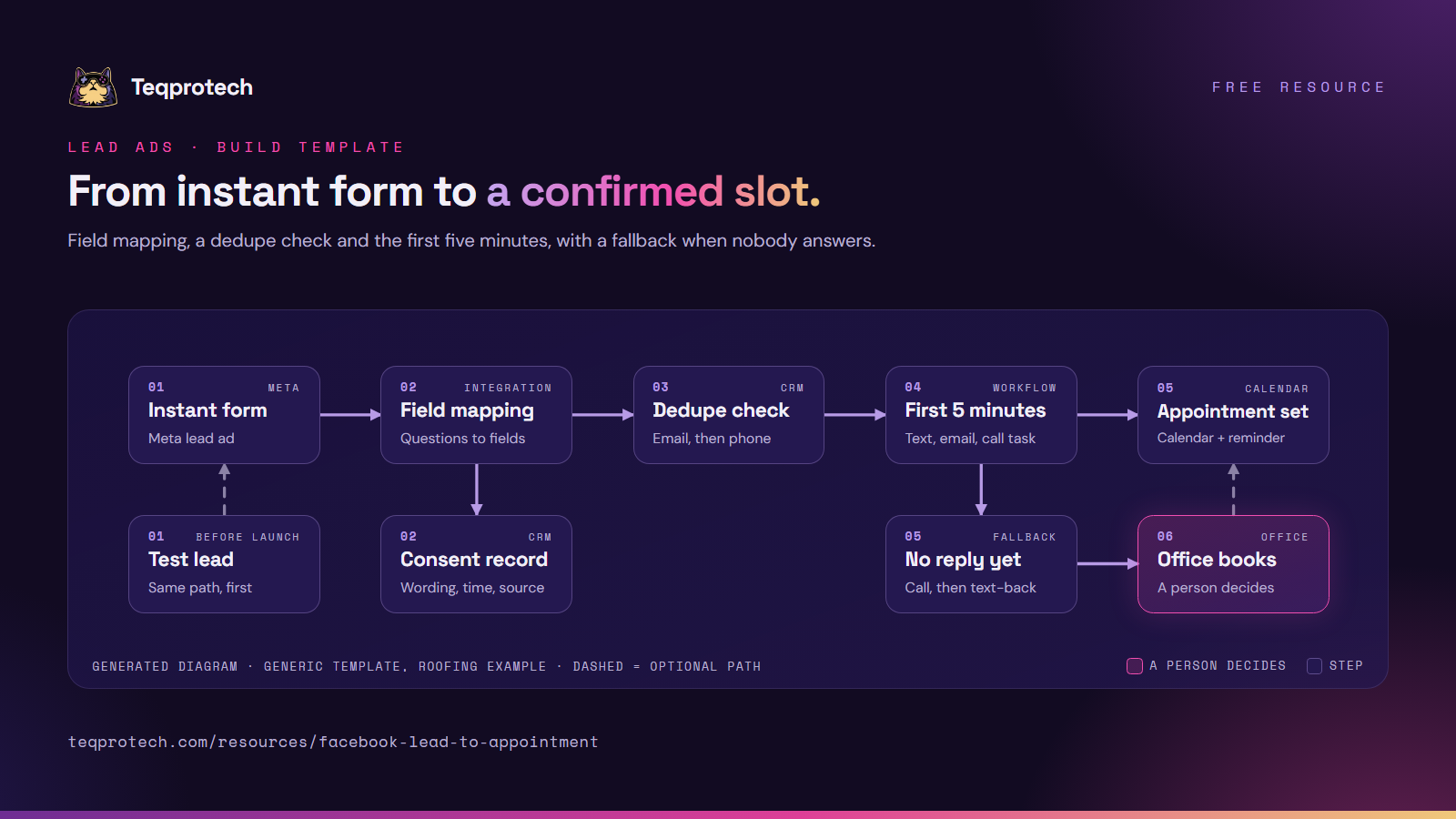
The example is a roofing inspection; the flow fits any business that books a visit or a call. Magenta marks where a person decides; dashed lines are optional.
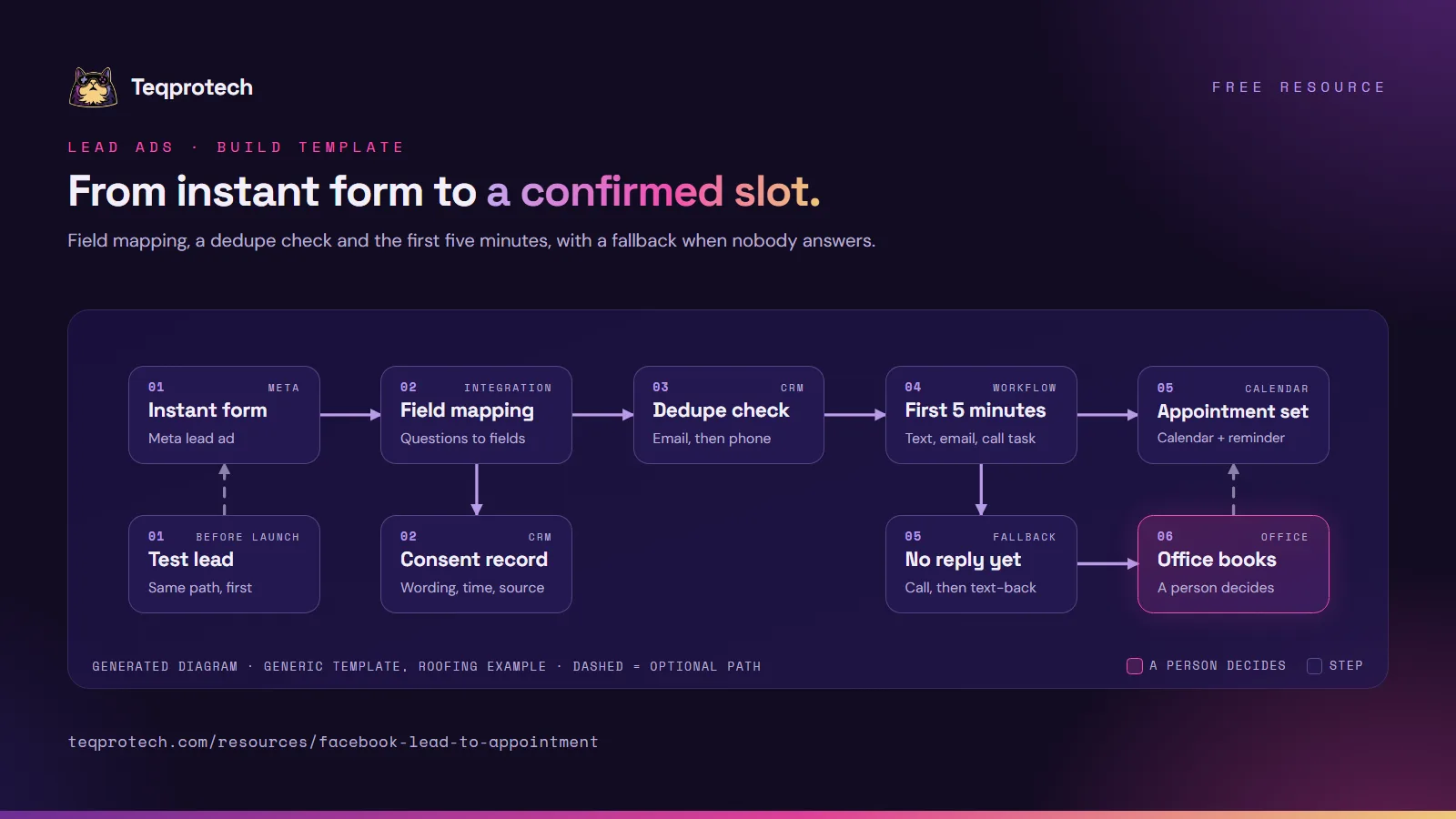
The flow on one image. Please credit and link this page.
Download the diagram (PNG)
Ask only what the first conversation needs: name, phone, email, the property ZIP code and one or two qualifying questions such as the type of work. Put your consent wording on the form itself, in plain language, as a custom disclaimer.
Add a custom field for every custom question, plus fields for first source, campaign, ad name and form name. Use dropdown fields where the form uses multiple choice, with exactly the same option labels.
Use the CRM's native Meta integration or a connector such as Zapier. In GoHighLevel, connect the page under Settings → Integrations, then map each question in Facebook Form Field Mapping. Check that nothing is left unmapped.
Decide how the CRM matches an existing contact (email first or phone first) and what happens on a match: update empty fields, add a note and a tag, never overwrite the first source.
Save the consent wording version, the time of submission and the form name with the contact, so anyone can see later what the person agreed to and where they came from.
Trigger it on the form submission (in GoHighLevel, the Facebook Lead Form Submitted trigger). Send the confirmation text and email, alert the person on duty with a call task, and add exit conditions for a reply, a booking or an opt-out.
If the call isn't answered, send a short text-back with the booking link and schedule the next attempt. The same text-back covers unanswered callbacks.
Create test leads with Meta's Lead Ads Testing Tool, follow each path the way a customer would, confirm every notification lands, then delete the test contacts in the CRM before going live.
Meta instant forms offer prefill questions (filled from the person's account, editable before they submit) and custom questions you write. Each one needs a home in the CRM before the first lead arrives.
| Meta form field | CRM field | Notes |
|---|---|---|
| Full name, or first and last name | First name, last name | Prefer separate first and last name questions so messages can greet by first name |
| Phone number | Phone | Check the country code format your CRM expects |
| Used as a dedupe key, so keep it required if you can | ||
| ZIP or postal code | Postal code | Drives service-area checks and territory routing |
| Custom question: type of work | Dropdown custom field | Option labels must match the form exactly |
| Custom question: timing | Dropdown custom field | Useful for routing urgent work to a call first |
| Custom disclaimer and consent checkboxes | Consent fields (text version, timestamp) | Store what was shown, not just "yes" |
| Form name, ad name, campaign | Source fields | Write once at creation; never overwrite later |
Tracking parameters you add to the form (values people never see) reach the CRM only if you map them too.
Duplicates. People submit twice, or fill in a form after calling. Decide the rule up front:
Consent.
Operational requirements:
This resource is an operational implementation pattern, not legal advice. Marketing and privacy rules change and depend on your business, audience and communication method. Have your compliance adviser review your final consent wording, calling rules and message templates before launch.
| Time | Channel | What happens | Stops if |
|---|---|---|---|
| 0:00 | CRM | Contact created or matched, source and consent saved, tag added | Duplicate already in the sequence |
| 0:00 | Internal alert | Person on duty gets an app or text alert with a call task | Someone claims the lead |
| Within a minute | Text | Confirms the request, names the business, offers a booking link, says a person will call | Opt-out reply |
| Within a minute | Same confirmation and booking link, with your contact details | Unsubscribe | |
| Around minute two | Call | Call from the person on duty, or an automated call that rings them first, then connects the lead | Lead books or replies |
| Minute five | Check | No booking and no reply: hand off to the missed-call fallback | Booking or reply |
Keep the text short and specific: "Hi [First name], thanks for your roof inspection request with [Business]. Pick a time here: [link]. Someone from our office will also call you shortly. Reply STOP to opt out." Adjust the opt-out line to your market.
When every item passes, launch with a small budget and read each new lead's history for the first few days.
Important: This template is a technical implementation guide, not legal advice.
Source: https://teqprotech.com/resources/facebook-lead-to-appointment · Teqprotech, updated October 10, 2026. Free to use and share with a link to the page above.
Describe your ad forms, your CRM and who answers the phone. The brief form opens with GoHighLevel and roofing selected.