Resources · AI agents

Human-approval architecture checklist for AI agents

A printable checklist for AI agents that read on their own but write only after a person says yes. Each item says why it matters and how to check it.

Checklist · Updated · Free to use and share with a link to this page.

Describe your workflow
Overview

Decide what the agent may do before you tune what it says.

An agent that can only read can be wrong without doing much damage. Once it can send, book, charge or delete, the questions change: which actions may it take alone, which wait for a person, and what happens after approve or reject. This checklist is about that architecture, not the prompt. Run it against a design doc or a live agent, and date the page.

It's a set of design checks, not a guarantee: no checklist makes a model correct. The aim is that a wrong output is stopped at a known point and leaves a record. The reasoning is in the article Human approval is an architecture decision; how we apply it is on the AI agents service page.

Architecture

Reads run. Writes wait for a person.

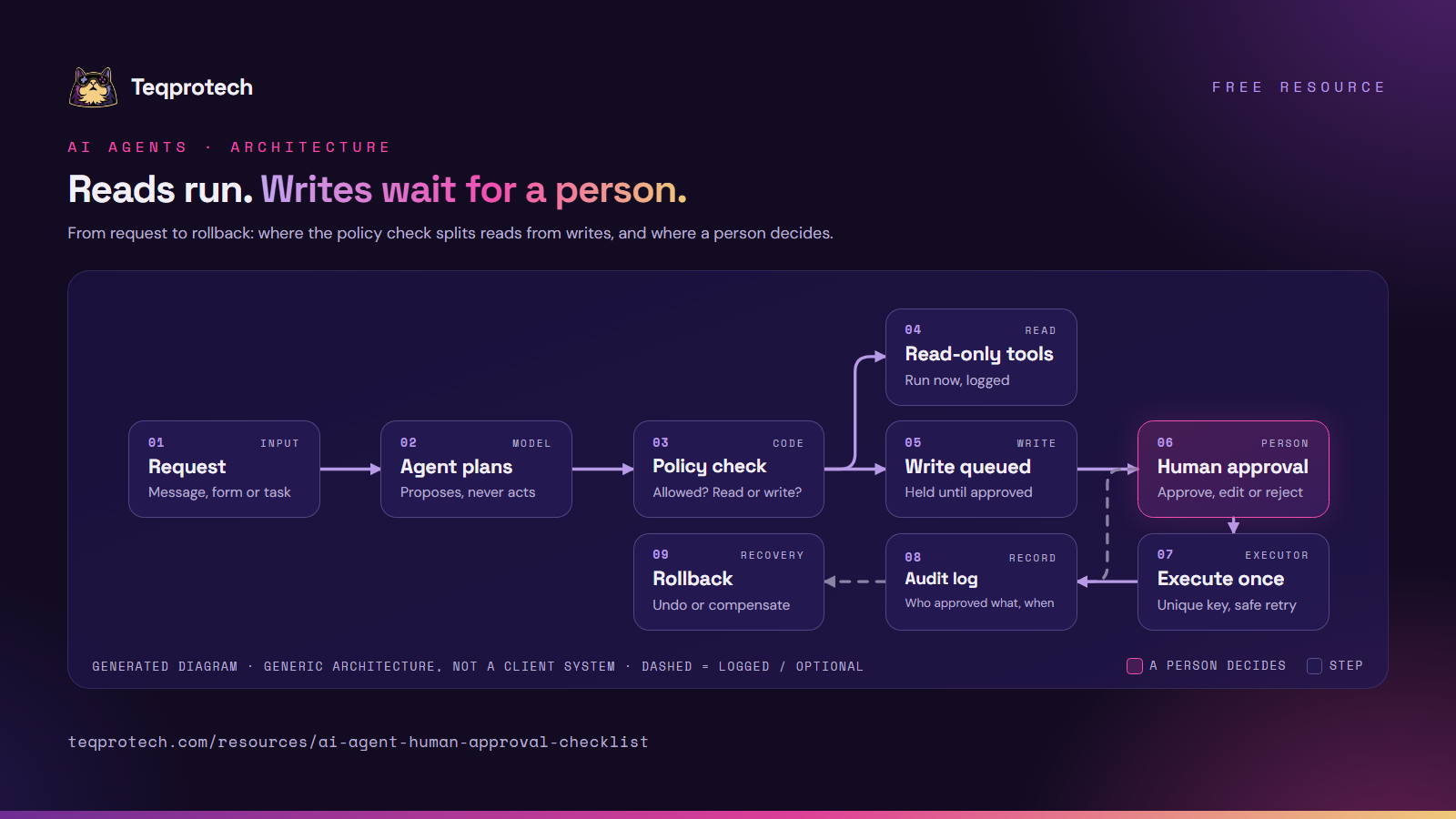
Reads and writes split at the policy check. Writes wait for a person, run once, and leave a record.
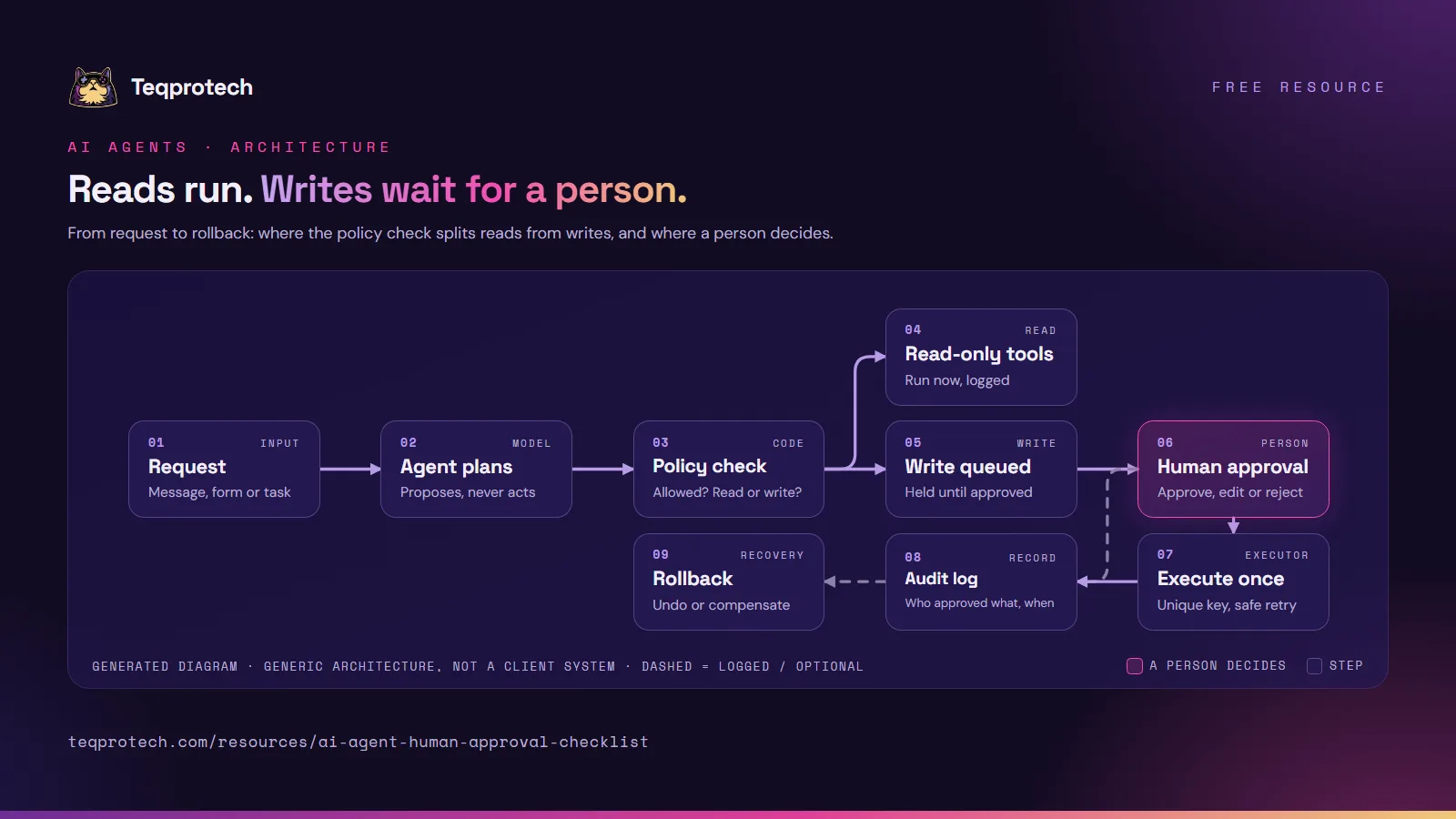
Human-approval architecture for an AI agent A request reaches the agent, which plans and proposes tool calls. A policy check sends read-only calls to run and queues write actions. A person approves, edits or rejects each queued write. Approved writes execute once with a unique key. Every step, including rejections, goes to the audit log, which points to a rollback or compensating step. RequestMessage, form or task Agent plansProposes, never acts Policy checkAllowed? Read or write? Read-only toolsRun now, logged Write queuedHeld until approved Human approvalApprove, edit or reject Execute onceUnique key, safe retry Audit logWho approved what, when RollbackUndo or compensate Human-approval architecture for an AI agent A request reaches the agent, which plans and proposes tool calls. A policy check sends read-only calls to run and queues write actions. A person approves, edits or rejects each queued write. Approved writes execute once with a unique key. Every step, including rejections, goes to the audit log, which points to a rollback or compensating step. RequestMessage, form or task Agent plansProposes, never acts Policy checkAllowed? Read or write? Read-only toolsRun now, logged Write queuedHeld until approved Human approvalApprove, edit or reject Execute onceUnique key, safe retry Audit logWho, what, when RollbackUndo or compensate
Main path Decision or human step Optional or feedback pathGenerated diagram of a generic pattern, not a screenshot of a client system.
Read the flow as text
  1. A request arrives: a message, form or task.
  2. The agent proposes tool calls; it can't run a write itself.
  3. A policy check classifies each call and blocks anything not allowed.
  4. Read-only tools run and are logged; writes wait in a queue.
  5. A person approves, edits or rejects the exact action.
  6. Approved actions execute once, under a unique key.
  7. Calls, approvals, rejections and results go to the audit log.
  8. A wrong write is traced to its undo or compensating step.

Download and share

Diagram: a request goes to the agent, which plans and proposes tool calls. A policy check sends read-only calls to run right away and queues write actions. A person approves, edits or rejects each queued write; approved writes execute once with a unique key, every step goes to an audit log, and the log points to a rollback or compensating step.

Download the diagram (PNG)

The nine steps on one slide, for a design review.

PNG · 1600×900 · 340 KB Download the diagram (PNG)
Cover page of the AI agent human-approval checklist summary: 28 checks in ten groups, with the Teqprotech cat mascot.

Download checklist summary (PDF)

One line per group plus the four build patterns, for a team meeting. For every check, use Print or save as PDF above.

PDF · 6 pages · 2.8 MB Download checklist summary (PDF)
Checklist · Action classes

Read, write or irreversible?

  • Every tool is labeled read, write or irreversible. Why: approval rules can only follow a classification that exists. How to check: list every tool with its class. Treat unlabeled tools as irreversible.
  • Read-only tools really are read-only. Why: a lookup that also updates a "last contacted" field is a write. How to check: read the tool's code or API scope, not its name.
  • Irreversible actions have no shortcut. Why: a sent email or a payment can only be corrected, not pulled back. How to check: confirm each irreversible call needs its own approval, with no "approve all" button.
Checklist · Approval UX

What the approver actually sees.

  • The screen shows the exact action. Why: people approve what they're shown, so a paraphrase is what gets approved. How to check: compare the screen with the payload the tool will receive: recipient, amount, date and text.
  • Approve, edit and reject are all real. Why: a screen with one obvious button trains people to click it. How to check: reject a queued action, then confirm nothing ran and the reason was stored.
  • An approval covers one version. Why: if the draft changes after approval, the approval no longer applies. How to check: edit an approved item and confirm it goes back to pending.
  • Pending items expire. Why: a yes given next week may rest on facts that changed. How to check: find the expiry rule and what the requester is told when an item lapses.
Checklist · Tools and credentials

Least privilege.

  • Each tool does one job. Why: a "run any query" or "call any URL" tool turns every prompt into a possible write. How to check: replace tools that take free-form SQL, URLs or commands with narrow ones.
  • The credentials can't do more than the tools. Why: if the key can delete, a bug or an injected instruction eventually will. How to check: read the API key's scopes or the database role and remove what no tool needs.
  • Write keys live with the executor, not the agent. Why: the gate only holds if the model's process can't reach the write API directly. How to check: confirm write credentials load only in the server-side component that runs approved actions.
Checklist · Validated outputs

Schemas before actions.

  • Model output is checked against a schema before any tool sees it. Why: a malformed or extra field should fail loudly, not reach business code. How to check: find the validator between the model call and each tool, and feed it a broken payload.
  • Values come from allow-lists. Why: free-text product names and recipients invite near-misses. How to check: confirm IDs, packages and statuses are validated against known lists.
  • Missing information stops the flow. Why: a model asked to fill a gap often fills it with a guess. How to check: send a request without a required detail and confirm the agent asks instead of proceeding.
Checklist · Business rules

Deterministic logic outside the model.

  • Prices, limits and eligibility are computed in code. Why: the model can explain a number, but shouldn't produce one the business must honor. How to check: trace every number in an outgoing action to a function or table, not to model text.
  • Rules are enforced by tools, not by the prompt. Why: a prompt instruction can be ignored; a check in code can't be talked around. How to check: for each "never" in the system prompt, find the code that enforces it.
Checklist · Budgets

Rate limits and spending caps.

  • Each run and each day has a ceiling. Why: a loop or a retry storm can send hundreds of messages before anyone looks. How to check: find the limits on tool calls, outgoing messages and model spend.
  • Hitting a limit stops and tells someone. Why: a silent cap looks like the agent working. How to check: lower a limit in staging, trigger it and confirm the alert arrives.
Checklist · Audit trail

Who did what, and why.

  • Each run records inputs, tool calls, outputs and decisions. Why: "why did it do that?" needs an answer days later. How to check: rebuild one past run from the log alone.
  • Every executed write has an approver and a time. Why: a write with no approval on record can't be told apart from one that skipped the gate. How to check: query for executed writes without a matching approval. There should be none.
  • Refusals are stored, not dropped. Why: a rejected or blocked action is evidence that the gate works. How to check: confirm rejected, blocked and needs-information appear as states in the log.
Checklist · Failure handling

Timeouts, retries and rollback.

  • Execution is idempotent. Why: a timeout followed by a retry must not send twice. How to check: give each approved action a unique key, retry it, and count the effects.
  • An unknown result counts as maybe done. Why: after a timeout you don't know whether the action happened. How to check: confirm the executor checks the target system before it retries.
  • Provider failures are reported, not filled in. Why: a fallback that invents a result hides the outage. How to check: switch off the model API in staging and read what the user sees.
  • Each write has an undo or a correction. Why: some actions can be reversed; others can only be followed by a fix. How to check: write the undo next to each write tool and test one.
Checklist · Testing

Evals before and after changes.

  • The gate has its own tests. Why: the approval path is the part that must never regress. How to check: find tests proving a write can't run unapproved and a rejected action never executes.
  • A fixed set of awkward inputs runs on every change. Why: a prompt or model update can shift behavior quietly. How to check: keep cases for missing data, conflicting instructions and requests to skip approval.
Checklist · Incident response

When something gets through.

  • There is an off switch someone can find. Why: the first move in an incident is to stop new writes. How to check: name the setting that disables writes and who can use it, then test it.
  • Each incident adds a test. Why: the same failure shouldn't need a second incident to be caught. How to check: add the input that caused it to the test set during the review.
Examples

Patterns from our builds.

These are hackathon builds and prototypes, not client deployments; each write-up credits its builders.

  • QuotePilot AI: the approval step. Zod validates Qwen's schema-constrained analysis, deterministic tools set price and availability, and the workflow stops at human approval. Approving runs the simulated email and CRM steps; rejecting records that nothing was sent.
  • ThesisCircuit: a risk governor, paper trading only. Agents propose typed theses, a critic objects, and a deterministic risk governor approves or vetoes. Consensus can't authorize an order, a rejection is an audited NO TRADE, and a timed-out submission is reconciled by client_order_id before any retry. Not investment advice.
  • CivicAI Readiness Blueprint: deterministic scoring. Local code scores ten readiness areas. An optional model call adds advisory insight in a strict JSON schema; without it, the scoring still works.
  • LockSmith: a gate before the deploy. Twelve fixed rules decide which migration statements are risky, IBM Bob rewrites them, and the same rules re-check the rewrite before CI passes it.
After the review

Fix in order.

Fix action classes and credentials first; they decide what a mistake can reach. Then the audit trail, then the rest. Rerun the list for each new tool, model or key.

Start here

Want a second look at an agent design?

Tell us what the agent should do and which steps worry you. The brief form opens with AI agents selected.